Scheduling Future Tasks in Emacs
24 Jun 2026 Charles Choi
Back when I had to run a lot of long-running simulations on Unix systems, I became an ardent user of the at command, which lets one schedule a program to run at a future date. I also used at to schedule different notifications, like sending a message to a pager (yer, how quaint).
Moving to macOS (nee OS X) changed that, as it disabled by default the at command due to battery life management. As I was unwilling to give up battery life for at, I learned to live without it. That was, until I learned that Emacs had run-at-time.
The run-at-time command does as it says on the tin: it will run a function at some future specification of time.
1 | |
That specification of time is “natural language-like” in that multiple string representations of time can be accepted, both absolute and relative.
The function can be anything Elisp offers, but running shell commands is what makes run-at-time a substitute for at, with some caveats.
Jobs that are submitted by run-at-time can be listed out via the list-timers command. You can cancel a job (actually a timer object) using the c key, bound to timer-list-cancel. Note that Emacs disables list-timers by default as it exposes timers that you should likely not mess with. Be forewarned.
Another caveat is that using run-at-time presumes that your Emacs session is still running at that future time. If you have Emacs running all the time (particularly as a server) then this should work without complication.
Example: Scheduling a macOS Notification
A common use I have for run-at-time is to send myself a notification at a future time. The way I prefer to be notified is using the macOS Notification Center. Here’s an example of what a notification looks like:
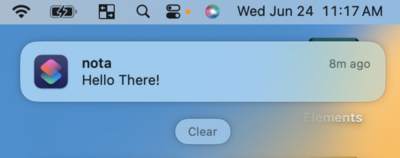
The above notification was sent using a macOS Shortcut I’ve defined named nota. Shown below is how nota is defined in the Shortcuts app.
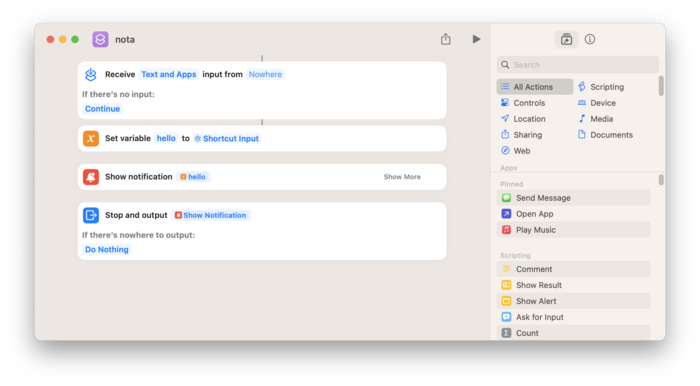
A macOS shortcut can be invoked from the command line. We can wrap this capability in the Elisp function cc/run-nota.
1 2 3 4 5 6 7 8 | |
Finally we can schedule cc/run-nota with run-at-time through the wrapper command cc/notify-at.
1 2 3 4 5 6 7 8 9 10 11 12 13 14 15 16 17 18 | |
Users wishing to install the nota macOS shortcut can download it via the following iCloud link:
Closing Thoughts
run-at-time is an underappreciated built-in which has given me much of what I used to use at for. If you use Emacs for implementing any kind of automation, you should include run-at-time as part of your toolbox for it.